
Scientific Sci-Fi Scanner1.1.9 - Google Play
You'll be able to see results in few seconds.
Publisher Description
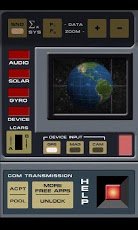
Please send bugs to the support email with device type so it can be fixed! There are over 2200 Android devices, so it takes time to support them all. Thank you for your patience!A real interactive multi-sensor and data visualization scanner with a sci-fi look and feel. This scanner has 9 modules: Solar, Geo, Weather, Audio, Gyro, Mag, GPS, Cam, and Device. Full HD graphics!SOLAR MODULEGraphs the last 96 hours of solar wind plasma readings from the US ACE satellite and displays the most recent Solar X-ray. Measured parameters are Proton Density, Bulk Speed, and Ion Temperature.GEO MODULEDisplays animated global satellite data from NASA on a 3D globe. Last 10 months of land surface temp, sea surface temp, vegetation index, and chlorophyll concentration.WEATHER MODULEDisplays current meteorological conditions from closest weather station. Temperature, wind speed and direction, pressure, humidity, precipitation.AUDIO MODULE (requires low-latency hardware, experimental)Displays a spectrum readout of the microphone's audio, as well as current dB levels and Hz frequency.MAG MODULEDisplays device-relative magnetometer readings. Comes with a spheroid visualization and raw microtesla vector and total field data.GPS MODULEDisplays WGS84-corrected coordinates on a 3D globe based on NASA satellite images. Zooms and rotates. Also displays readout of latitude, longitude, and altitude values and has a working compass.GYRO MODULEDisplays device attitude in real world space (3-axis bubble level). Includes gyro sphere pointing to world up and numerical data for world up vector.DEVICE MODULEDisplays device data (unique ID, system memory, graphics memory, graphics API, OS, processor name, number of cores, device name).CAM MODULE (experimental)Turns the scanner screen into a live movie feed. Also displays raw RGB levels of your phone's camera.QUALITY BUTTONAdds screen FX to simulate a CRT monitor. The noise and chromatic aberration effect tax the GPU, so "high Q" may not work on all phones.SND BUTTONToggle computer beeps and scan hums. RECOMMENDED TECH SPECS-Low-latency audio pipeline (for Audio Module only). This allows for live analysis of microphone data.-Screen resolution larger than 480x800, 300+ ppi.-If you experience crashes outside of the Audio module, quit other open applications (in Android's Settings menu) and try again, as this is typically due to an out-of-memory error. The app will also continue to be optimized over time to accommodate older phones.Verified on following devices:HTC Nexus OneMotorola ElectrifyLG RevolutionPhoton 4GSamsung Galaxy S3Cam Module may only show black on:Samsung Galaxy NexusSamsung Galaxy WLG Optimus Thrill 4GAsus Eee Transformer TF-101Motorola Droid-xHTC One XSHARP AQUOS PHONE 102SHNexus SAny phone without a camera (naturally)LEGALThis application is not in any way affiliated with any property other than that of its creator.
About Scientific Sci-Fi Scanner
The company that develops Scientific Sci-Fi Scanner is Dan Miller-Schroeder. The latest version released by its developer is 1.1.9.
To install Scientific Sci-Fi Scanner on your Android device, just click the green Continue To App button above to start the installation process. The app is listed on our website since 2013-04-24 and was downloaded 0 times. We have already checked if the download link is safe, however for your own protection we recommend that you scan the downloaded app with your antivirus. Your antivirus may detect the Scientific Sci-Fi Scanner as malware as malware if the download link to com.danms.SciFiScanner is broken.
How to install Scientific Sci-Fi Scanner on your Android device:
- Click on the Continue To App button on our website. This will redirect you to Google Play.
- Once the Scientific Sci-Fi Scanner is shown in the Google Play listing of your Android device, you can start its download and installation. Tap on the Install button located below the search bar and to the right of the app icon.
- A pop-up window with the permissions required by Scientific Sci-Fi Scanner will be shown. Click on Accept to continue the process.
- Scientific Sci-Fi Scanner will be downloaded onto your device, displaying a progress. Once the download completes, the installation will start and you'll get a notification after the installation is finished.
Program Details
System requirements
Download information
Pricing
Version History
version 1.1.9
posted on 2013-04-24
version 1.1.9
posted on 2013-04-24
Several fixes and updates
Disclaimer
Official Google Play Link
We do not host Scientific Sci-Fi Scanner on our servers. We did not scan it for viruses, adware, spyware or other type of malware. This app is hosted by Google and passed their terms and conditions to be listed there. We recommend caution when installing it.
The Google Play link for Scientific Sci-Fi Scanner is provided to you by apps112.com without any warranties, representations or guarantees of any kind, so access it at your own risk.
If you have questions regarding this particular app contact the publisher directly. For questions about the functionalities of apps112.com contact us.
